Search K
Appearance
Released: 2025-12-02
The PHP-FPM integration has a new integration mechanism called the isolated PHP-FPM. In isolated PHP-FPM, each user account gets a dedicated PHP-FPM service. This allows PHP-FPM to be executed in a jailed environment and achieves a complete isolation of execution between different user accounts.
Key improvements of the isolated FPM compared to the standard FPM:
All the benefits for the new mode come with an increase in the total memory consumption. The server should have enough memory to allow each user to have a separate FPM process. A single user could have multiple PHP-FPM processes when multiple PHP versions are in use (separate FPM process per PHP version). The PHP-FPM is patched to terminate after 10 minutes of inactivity.
The isolated PHP-FPM mode at the moment is an opt-in feature that is enabled with the special isolated_fpm=1 flag in directadmin.conf. To test out the new mode, it is enough to execute the following commands:
da config-set isolated_fpm 1 --restart
da build phpNote: The isolated FPM is activated only for the user accounts that use jailshell (the Jailed check box in the user configuration page).
The file/folder action toolbar now automatically fits as many action buttons as possible based on your browser width. Extra actions move into the "More" dropdown. This reduces wasted space and makes common actions easier to reach on both large and small screens.
The copy dialog now uses a new API endpoint, supports copying one or multiple selected files or folders in a single action, and shows operational errors in the same dialog. With this update, the old Duplicate action has been also removed.
The trash view in File Manager has been improved to make cleanup easier:
The "Move Users Between Resellers" page (located in admin level, Account Manager category) was updated. It now gives clear instructions of what steps need to be taken in order to move users.
Previous OpenLiteSpeed versions were installed on top of older installations, often leaving behind legacy files that caused unpredictable side effects. The installation process has now been rewritten to always perform a clean install. If the preparation phase encounters any issues, the process exits early without stopping the running web server.
To enable minimal-downtime upgrades, two core changes were introduced:
1. Log file changes:
/usr/local/lsws/admin/logs have been moved to /var/log/openlitespeed.2. Configuration file changes:
/usr/local/lsws/conf to /etc/openlitespeed.custom/openlitespeed/conf/*.configure/openlitespeed/conf/ are copied from the custom/openlitespeed/conf/.configure/openlitespeed/conf.d/ has been added. Everything from the custom/openlitespeed/conf.d/ will get copied over /etc/openlitespeed/conf.d/ and automatically included via wildcard include in httpd_config.conf.configure/openlitespeed/admin/admin_config.conf2.8.12 to 2.9.24.98.2 to 4.993.8.0 to 3.8.16.3.4-7 to 6.3.4-811.8.4 to 11.8.51.1-81 to 1.1-868.3.27 to 8.3.288.4.14 to 8.4.158.5.0RC4 to 8.5.08.2.3 to 8.4.01.4.29 to 1.4.30If a domain or subdomain uses a non-standard ModSecurity configuration, the configuration will be included in the user account backup files.
Performing a restore operation on the backup will restore the ModSecurity configuration if the backup file contains it.
modsecurity_enabled configuration option in directadmin.conf update This new configuration option controls if the web server templates should include the configuration directives for ModSecurity.
Server administrators do not really need to care about this option. The CustomBuild will automatically set this option to the correct value when ModSecurity is being used.
The jailshell script has the following changes:
--as-pid-1 parameter when starting the bwrap. This starts only one bwrap process instead of two and keeps bash as the PID 1 process inside the jailed container. Users from inside the jail will no longer see the bwrap process in the process list./var/run exists inside the jailed container./home/mysql/mysql.sock inside the jailed container./tmp/mysql.sock file inside the jailed container will always be linked to /var/lib/mysql/mysql.sock outside the jailed container./run/systemd/notify socket inside the jailed container. This socket is used for jailed systemd services.Inputs were not being validated in multiple pages. This includes pages such as user/reseller/admin creation, package creation, domain creation and more.
The service instance name for user-owned Redis instances has changed from redis@{username}.service to redis@{UID}.service.
This service rename allows us to rely on systemd to manage service placement into resource control groups. This fixes the cgroups permission bug that used to cause systemd error messages when starting a user systemd instance.
Example error messages:
systemd[3584620]: Failed to create /user.slice/user-1000.slice/user@1000.service/init.scope control group: Permission denied
systemd[3584620]: Failed to allocate manager object: Permission deniedNote: If the Redis service file was customised (redis@.service or redis_lve@.service), please make sure to update the custom service file to use UID-based instance names.
CLI=1 option in domain.conf is no longer used removal Adding the CLI=1 line in the domain configuration file will be ignored. It used to be possible to force generating Apache configuration files for mod_php by manually adding this line in the domain configuration file. The mod_php integration is no longer supported, and this feature is removed.
The "Select All" option was removed from the following:
Step 1: Who.cloud_cache configuration option from directadmin.conf removal This option will always be enabled.
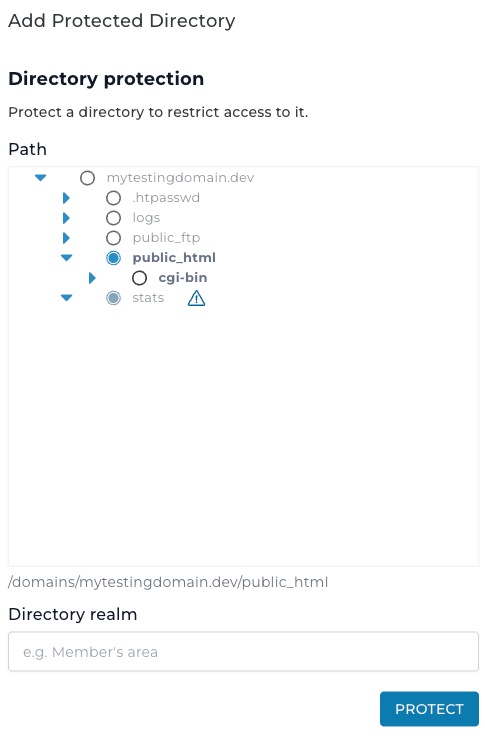
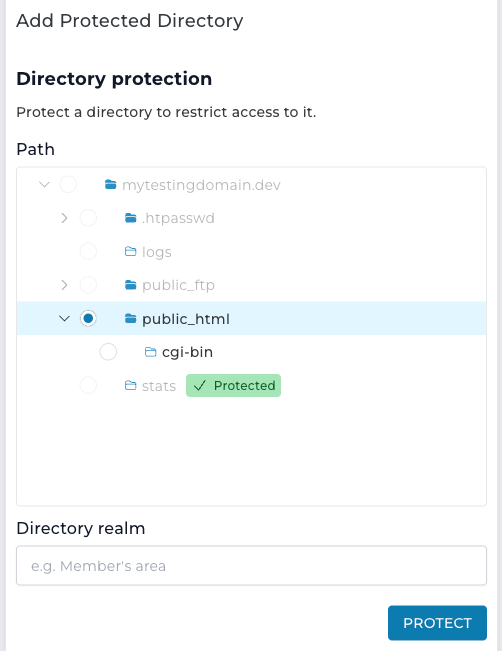
Updated the protected directories view with a modernized tree selector featuring improved accessibility and full keyboard navigation support.