
Search K
Appearance
Released: 2026-04-28
Disk usage statistics are backported into the legacy DirectAdmin code base.
Support for running fully isolated user owned PHP-FPM instances in backported to the legacy DirectAdmin code base.
The command to install Easy Spam Fighter da build easy_spam_fighter is now an alias to da build exim_conf.
The command to remove Easy Spam Fighter da build remove_easy_spam_fighter is removed. When ESF is disabled, it will be automatically removed with the next Exim configuration update.
The following commands should be used for toggling ESF on or off:
# Enable ESF
da build set easy_spam_fighter yes
da build exim_conf

# Disable ESF
da build set easy_spam_fighter no
da build exim_confThe CustomBuild command da build rspamd_conf is now an alias to the da build exim_conf command. When the Rspamd service is installed or removed, CustomBuild will automatically update the Exim configuration.
Plugin Manager page (reachable via admin level) has been redesigned with new API endpoints:
installed=no state, but in those cases a warning will be shown.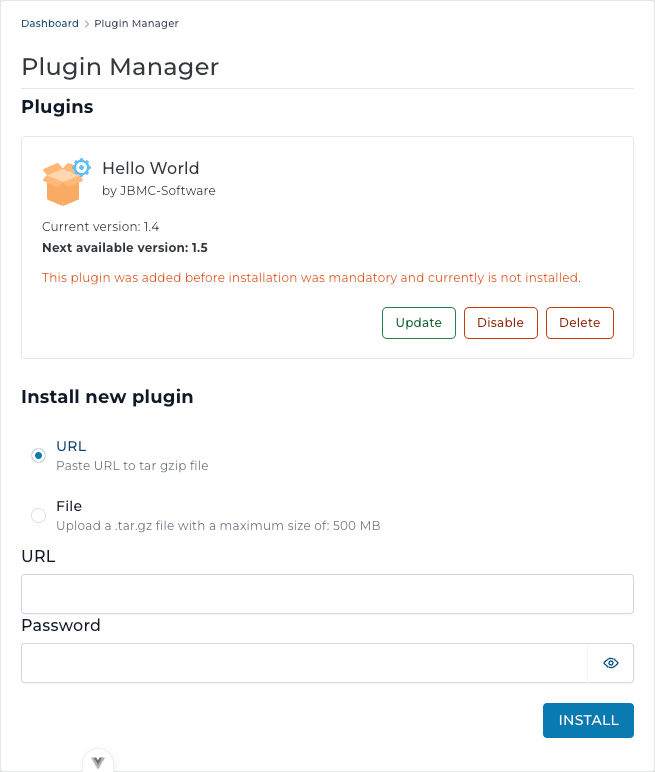
DNS record creation and edit dialogs now opt in to manual editing for TXT records the same way - by selecting "Plain" using "TXT Record Type" input field.
Subsequently, the "Edit Manually" checkbox for SRV records was moved directly below "TTL" input field.
The File Manager editor is now displayed as a full page. The sidebar is hidden, and other interface elements were improved to provide a better file editing experience.
File selection behavior in File Manager was improved to make selecting files and folders more predictable and easier to use.
Main changes:
In version 1.699, we removed the Edit in new tab action because it was no longer needed as a separate option. The Edit and Open actions are now regular links, so you can use your browser's standard options to open them in a new tab, a new window, or elsewhere.
Toggle button pattern has been standardized across the panel. Fixes dark mode contrast issues in several places that used the previous implementation.
2.9.5 to 2.9.76.3.5-1 to 6.3.5-21.1-91 to 1.1-928.0.45 to 8.0.468.4.8 to 8.4.91.29.8 to 1.30.02.5.6 to 3.0.11.8.5 to 1.9.01.3.9 to 1.3.9aEndpoints CMD_DNS_CONTROL, CMD_DNS_ADMIN, CMD_DNS_RESELLER now return TTL value for NS records.
Inputs are now validated when creating or editing MX records
When creating or editing a DNS record for domain pointer, value input field showed domain within hint when it should have showed pointer domain instead.
Circle charts on the Resource Limits page could appear invisible because of color issues. This release fixes the chart colors so usage data is visible again.
Tables on the Git page could overlap each other. This release fixes the layout so all table content is displayed correctly.
Searching for a domain now correctly navigates to the domain edit page.
Dropped "Copy" table action from the following pages:
The maximum size limit for email messages to be checked with a spam service (SpamAssassin or Rspamd) is removed. The Easy Spam Fighter configuration is updated to always perform a spam scan.
This limit used to be too small (default value was 200 KB) and was an easy way to bypass spam checking. Now each spam service is responsible for checking the message size and deciding if it needs to be fully or partially checked for spam. This allows spam checking of emails with a large file attached.
The message size limit used to be managed with the option EASY_SPAMASSASSIN_MAX_SIZE in the /etc/exim.easy_spam_fighter/variables.conf file. This variable is no longer used and removed from the default ESF configuration.
"System Information" page is now only available from the user level.
The /evo/admin/ssl page (aka: CMD_ADMN_SSL?json=yes) was incorrectly showing the state of domain pointer certificates for the SSL and Activecolumns.