
Search K
Appearance
Released: 2026-05-18
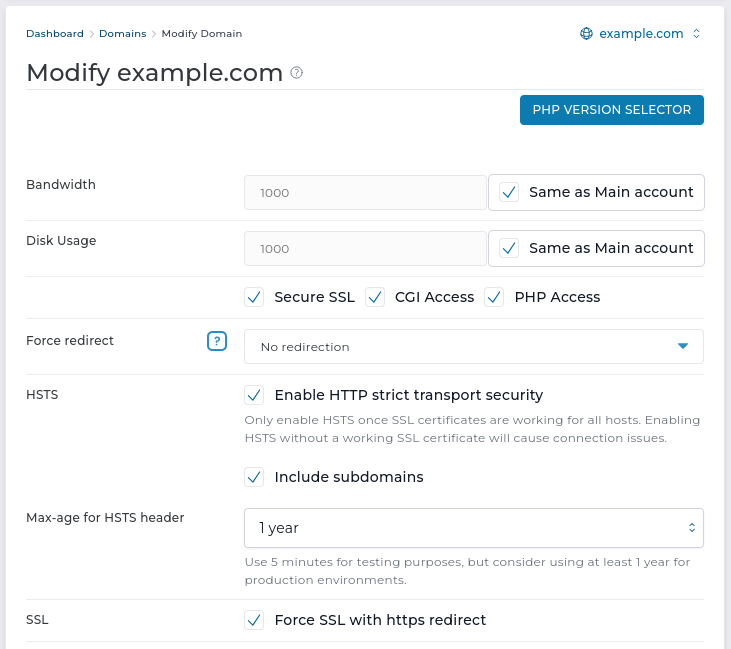
Evolution now supports enabling HSTS (HTTP Strict Transport Security) per domain, matching the functionality already available in the Enhanced skin. You can enable this option when editing a domain.
You can also enable HSTS for subdomains and choose the max-age value for the HSTS header.
Only enable HSTS after SSL certificates are working for all related hosts. If HSTS is enabled without valid SSL, users may not be able to access the site.
A new integration with the needrestart tool is added. If this tool is installed, it will be used to detect a situation when a new Linux kernel package has been installed but the server was not rebooted and is still using the old kernel.
A system message will be sent to all server administrators with a reminder to restart the server.
Installation of this tool is managed by CustomBuild. A new configuration option needrestart=yes/no is introduced in the CustomBuild options.conf file. This option is enabled by default. CustomBuild will show an available update if this tool is not installed on the server.
If pending server restart notifications are not needed, it can be disabled with this command:
da build set needrestart noRole based prefixes (user/, reseller/, admin/) have been removed from all URLs. Pages can still be accessed with old URLs, but this may be removed in a future release.
Previously, the File Manager editor still allowed users to click "Save" even when they did not have the filemanager-actions permission, and only then showed a soft error.
Now, the "Save" button is disabled for users who do not have this permission.
2.9.7 to 2.9.82.4.3 to 2.4.44.99.2 to 4.99.36.3.5-5 to 6.3.5-610.11.16 to 10.11.1710.6.25 to 10.6.2611.4.10 to 11.4.1111.8.6 to 11.8.71.30.1 to 1.31.13.0.1 to 3.0.21.9.0 to 1.9.0.15.11.1 to 5.13.08.6.2 to 8.6.31.6.15 to 1.7.1The limits system for counting sent emails is restructured. Key improvements:
/etc/virtual/usage/{name}_ids directory are no longer needed.Changes in configuration files:
| File | Action | Comment |
|---|---|---|
.../configure/exim/exim.conf | ⚠️ updated | Moved limits check from SMTP routers to the last stage of ACLs. |
.../configure/exim/exim.pl | ⚠️ updated | Replaced sent email limits checking and updating logic. |
.../configure/exim/exim.strings.conf | ⚠️ updated | Removed no longer used USER_TOO_MANY and AUTH_TOO_MANY messages, updated USER_ON_BLACKLIST_SCRIPT message. |
If any of the updated or removed files were customised, please adjust them to stay in sync with the new configuration layout.
The Enhanced skin navigation bar is updated to have a link to switch to the Evolution skin.
Enhanced skin is no longer actively maintained. The easy way to temporarily switch skin will allow users to access features that are not available in Enhanced skin.
The Exim mail server configuration is updated to have direct integration with spam-checking services Rspamd or SpamAssassin.
In previous DirectAdmin versions there were three different ways of performing spam checking:
The new Exim configuration has direct integration with spam-checking services. Using Easy Spam Fighter is no longer mandatory. Key benefits of the new configuration structure:
spamd=no in CustomBuild options.conf file).Notable configuration changes on the system:
/etc/exim/spamd.global.conf/etc/exim/spamd.acl_smtp_data.conf/etc/exim.conf file./etc/exim/rspamd are removed./etc/exim.spamassassin.conf is removed.Here is the list of how this change is reflected in the CustomBuild configuration files structure.
| File | Action | Comment |
|---|---|---|
.../configure/exim/exim.spamassassin.conf | ❌ removed | Legacy integration using Exim transport. Not supported anymore. |
.../configure/rspamd/check_message.conf | ❌ removed | Spam checking logic, now stored in exim/rspamd.acl_smtp_data.conf. |
.../configure/rspamd/connect.conf | ❌ removed | No longer relevant. |
.../configure/rspamd/variables.conf | ❌ removed | Global configuration, now stored in exim/rspamd.global.conf. |
.../configure/easy_spam_fighter/check_rcpt.mid.conf | ❌ removed | ACL variables acl_m_spam_user and acl_m_spam_domain are now set in the main exim.conf. |
.../configure/easy_spam_fighter/check_mail.conf | ⚠️ updated | ACL variables acl_m_spam_user and acl_m_spam_domain are now set in the main exim.conf. |
.../configure/easy_spam_fighter/check_message.conf | ⚠️ updated | It will no longer connect to spam-checking service. It expects Exim to perform it. |
.../configure/easy_spam_fighter/connect.conf | ⚠️ updated | No longer has Rspamd-specific logic. |
.../configure/easy_spam_fighter/variables.conf | ⚠️ updated | No longer has Rspamd-specific logic. |
.../configure/exim/exim.conf | ⚠️ updated | Performs spam checking by including /etc/exim/spamd.global.conf and /etc/exim/spamd.acl_smtp_data.conf. |
.../configure/exim/rspamd.acl_smtp_data.conf | ✅ new | Performs spam checking with Rspamd, the same logic used to be in rspamd/check_message.conf. |
.../configure/exim/rspamd.global.conf | ✅ new | Global configuration for connection to Rspamd, the same logic used to be in rspamd/variables.conf. |
.../configure/exim/spamassassin.acl_smtp_data.conf | ✅ new | Performs spam checking with SpamAssassin, the same logic used to be in easy_spam_fighter/check_message.conf. |
.../configure/exim/spamassassin.global.conf | ✅ new | Global configuration for connection to SpamAssassin. |
If any of the updated or removed files were customised, please adjust them to stay in sync with the new configuration layout.
Roundcube 1.7 enforces a mandatory public_html entry point, which required changes to the CustomBuild installation procedure.
/var/www/webapps/ with the public_html directory symlinked to /var/www/html/roundcube/var/log/roundcube (previously /var/www/html/roundcube/logs)/var/www/tmp/roundcube (previously /var/www/html/roundcube/temp)The backup status dialog (located in Admin Backup and Restore -> In Progress -> Details) now displays Details: section.
The content of reseller backups page (located in Reseller Tools -> Manage User Backups) no longer appears at the bottom of the screen.
Some pages could lose table pagination when invalid values (0 or negative numbers) were passed to the "Rows per page" or "Page number" properties. Table pagination is now displayed correctly.
Some Evolution actions redirected users to the File Manager editor for quick file changes. If a user did not have access to File Manager, those redirects still ran and caused errors.
To prevent this, the affected actions were removed or hidden on the Custom Error Pages and SpamAssassin page. These files can still be opened and edited through other available methods.
Some values in the server usage statistics table (/evo/server-stats/usage) could be missing when admin.allocation or admin.usage files are missing, unreadable, or malformed. Error handling has been improved, and available statistics now display correctly.
Selecting a different domain while in subdomain logs page (located in user level -> Subdomain Management -> usage Log / error Log) caused incorrect logs to be displayed.
To prevent inconsistent data, domain selector has been removed from this page.
The validation for "Username" and "Realm" input fields (within protected directories page) was updated.
If attempting to create a database with a name that consists of more than 63 characters, validation error will be shown.
Widget "View more" link now correctly routes to plugins.
The protected directories configuration generator for the Nginx web server is updated to ensure special symbols in the directory name will not cause a malformed configuration file.
When a cpanel backup is converted to a DirectAdmin backup before a restore, the .creation_time files were not being created, preventing auto-renewal of LetsEncrypt certificates. This fix creates the missing files during conversion.
Improved locking and logic for writing the users.list, reseller.list, admin.list files. It will mostly help those who make parallel API calls to create accounts, but also affects account creation via GUI and restores. Any errors with this new add_to_list will be logged in the error.log or errortaskq.log files, with strings starting with add_to_list:%s: ..., where the %s would represent the account that was to be added to the list, followed by the reason for the error (locking, reading, or writing). In addition to the better locking logic, should any lock fail to be obtained (which will be far less likely), it will trigger new task.queue commands to rebuild those lists:
action=rewrite&value=users.list&creator=fred
action=rewrite&value=reseller.list&creator=admin
action=rewrite&value=admin.list&creator=admin
where creator must be presenty for any of these rewrite types. The creator for the users.list variant can be a Reseller or Admin, and the reseller.list and admin.list must be an Admin.
Previously, available plugin version was fetched from version_url (stored in plugin.conf) any time Plugin Manager page was accessed.
The new (GET /api/plugin-manager/plugins) and legacy (GET /CMD_PLUGIN_MANAGER) API endpoints have been updated to cache available version for 30 minutes instead.
The "Notify" checkbox was removed from the Create Vacation Message form because it had no effect.
Back in version 1.694 we made plugin installation non-optional (successfully run plugin's install.sh script) when it's being uploaded. And back in version 1.700 we hid the install/uninstall actions from Evolution. The idea was that there is no reason for install/uninstall to live as separate actions and that they should be a core part of plugin upload or deletion process.
With this change, we're dropping installed state (saved within plugin.conf) completely.
The following API endpoints are removed:
POST /CMD_PLUGIN_MANAGER {"install": "yes"}POST /CMD_PLUGIN_MANAGER {"uninstall": "yes"}POST /api/plugin-manager/plugins/{id}/installPOST /api/plugin-manager/plugins/{id}/uninstallUI changes:
If you have an uninstalled plugin (install action was not performed when adding plugin before version 1.694 or installed state was set to no by executing uninstall action after plugin was uploaded), there are two options to install the plugin:
install.sh script directly (which is found in /usr/local/directadmin/plugins/{id}/scripts folder)