
Search K
Appearance
Released: 2026-08-04
lego (ACME client) version 5 new This DirectAdmin release supports using lego version 5. This release of lego CLI tool supports automatic ZeroSSL account creation and no longer needs custom patches from DirectAdmin.
The CustomBuild will start downloading lego tool directly from upstream.
The new lego version uses a slightly different data directory structure. During the upgrade from version 4 to version 5 a copy of data directory will be created and automatically migrated to the new format. New lego data directory will be /usr/local/directadmin/data/lego (old directory used the name .lego). The old directory is not automatically removed. This allows jumping between different major lego releases without having to recreate ACME accounts.
CustomBuild is extended to support installing these PHP extensions:
pdo_pgsql - the PostgreSQL PDO driver (native extension)mailparse - extension for working with email messages (from PECL). Only supported with PHP 7.3 or higher.default_acme_profile configuration option in directadmin.conf new This is a low-level ACME setting that allows users to experiment with non-default Let's Encrypt certificate profiles.
If this value is not empty, the configured profile will be used for all ACME certificate requests.
Moved directadmin.conf backup and restore settings from the admin backups settings dialog to a separate "Administrator settings" sub-page. Clarified the purpose of each setting through improved labels and descriptions.
File Manager is updated to show modify time directly from filesystem instead of showing most recent of file content modified & file attributes changed times.
The external DNS provider setting section in the ACME settings page is updated to show all available configuration options for each provider. Key improvements:
lego tool documentation.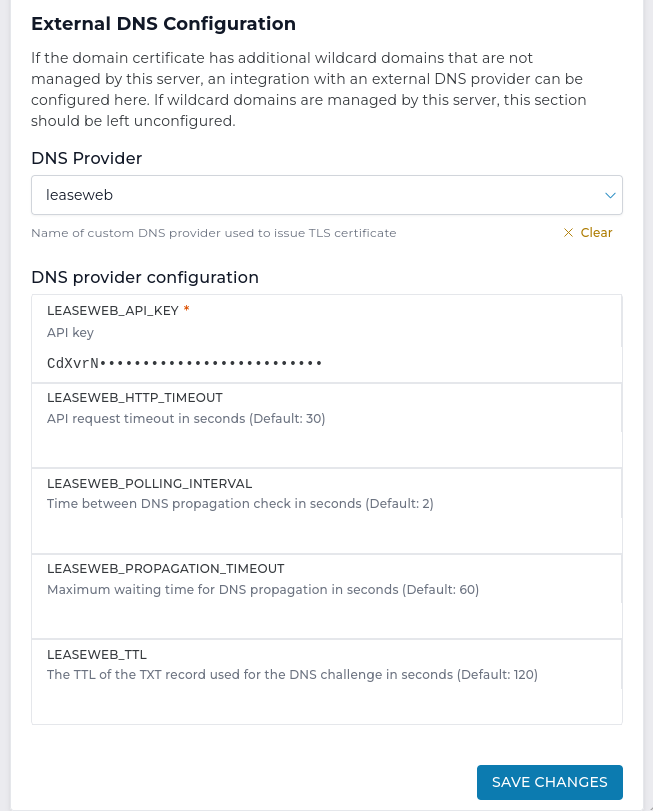
Users now have to explicitly set the limit to "Max" or "Unlimited" for "Change Limit/Quota" dialog inputs, where previously the same effect could be achieved by leaving the input blank.
As part of a larger internal refactoring the following appear different visually, but remain the same in functionality:
As part of a larger internal refactoring the "Create Mail Account" page has seen some improvements:
As part of a larger internal refactoring the "Create Domain" page has seen some improvements:
Improved the administrator-level backups page:
3.2.0 version6.3.6-0 to 6.3.6-68.4.10 to 8.4.118.2.32 to 8.2.338.3.32 to 8.3.338.4.23 to 8.4.248.5.8 to 8.5.915.08 to 15.094.31.0-SNAPSHOT-a0eae4e3 to 5.3.10.6.0 to 0.7.01.31.2 to 1.31.35.16.0 to 5.18.08.8.0 to 8.10.0Running CMD_PLUGINS no longer generates the following error log entries if plugin's plugin.conf file contains an empty timeout= field:
Plugin ${pluginID} is trying to set a timeout value of 0, which is larger than UINT_MAX: 4294967295.
Falling back to timeout value of: 600Fixed an issue where it was impossible to change only the password using the "Change Password/Username" action in "E-mail Accounts" page if username included non-ASCII characters.
If user had unlimited e-mail quota and user_email_quota_max was set to something other than 0 or -1, it was impossible to change quota for that email account.
Previously, when creating an e-mail account, if max_per_email_send_limit was configured to anything other than 0, the "Max" button could not be used.
When editing an authorized SSH key, if any of the checkbox options were selected (no-X11-forwarding, no-agent-forwarding, no-port-forwarding), they did not show up on subsequent edits of the same key. Which caused the mentioned options to disappear unless they're explicitly set again on every subsequent edit.
Users with the "DNS control" feature flag disabled were still able to see the "DNS Management" menu entry, which led to a "404 Not Found" error. The menu entry has been updated to use the correct route and respect the feature flag.
Administrators/Resellers impersonating users without DNS control will no longer be able to navigate to the DNS Management page and should use their respective level pages instead.
The script used to restore Roundcube data is updated to work with RoundCube version 1.7. Since version 1.7, Roundcube uses different configuration file location. The restore script will try multiple configuration file locations to work with any RoundCube version.
Within "Log Viewer" page, it is no longer possible to submit the form by pressing enter if "Load log" button is disabled.
When hovering over "Last modified" column data, the timestamps describing when file was created or last updated are no longer shown.